A free DynamoDB GUI client for developers
DynamoOps is a desktop app for Amazon DynamoDB on macOS and Windows. Browse tables, run Scan, Query and PartiQL, edit items in place and see what each operation cost, without waiting for the AWS Console to reload.
macOS and Windows · No account required
What is a DynamoDB GUI?
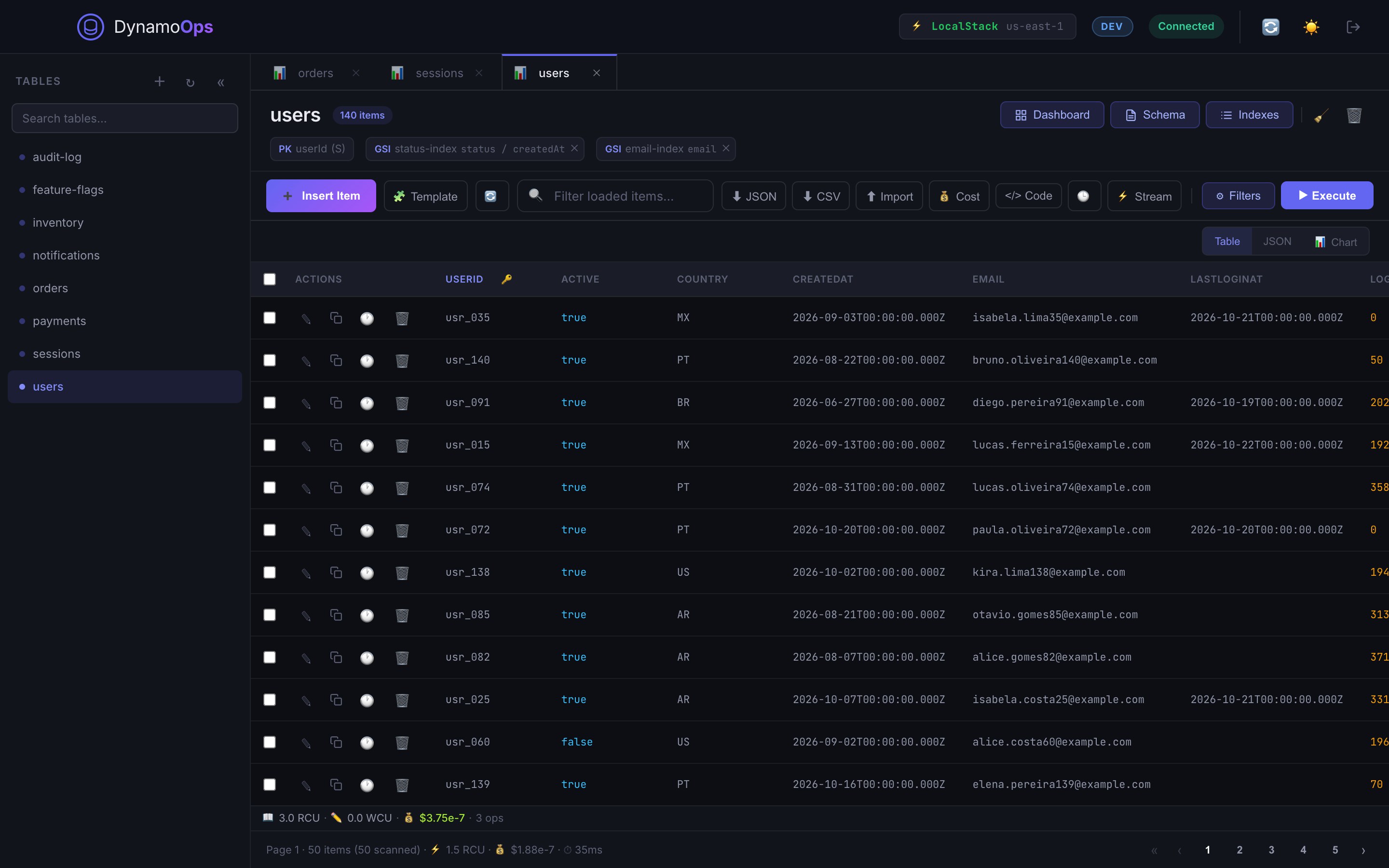
A DynamoDB GUI is a graphical client for Amazon DynamoDB. Instead of writing AWS CLI commands or clicking through the AWS Console, you open a table in a grid, filter it, and edit items directly. A good DynamoDB client also handles the parts the console makes slow: switching accounts and regions, querying secondary indexes, importing and exporting data.
DynamoOps is a DynamoDB GUI built for backend engineers and platform teams who work with DynamoDB every day, against real AWS accounts and against local emulators.
What you can do with DynamoOps
- Scan with filter expressions and Query by key on the table or any GSI or LSI.
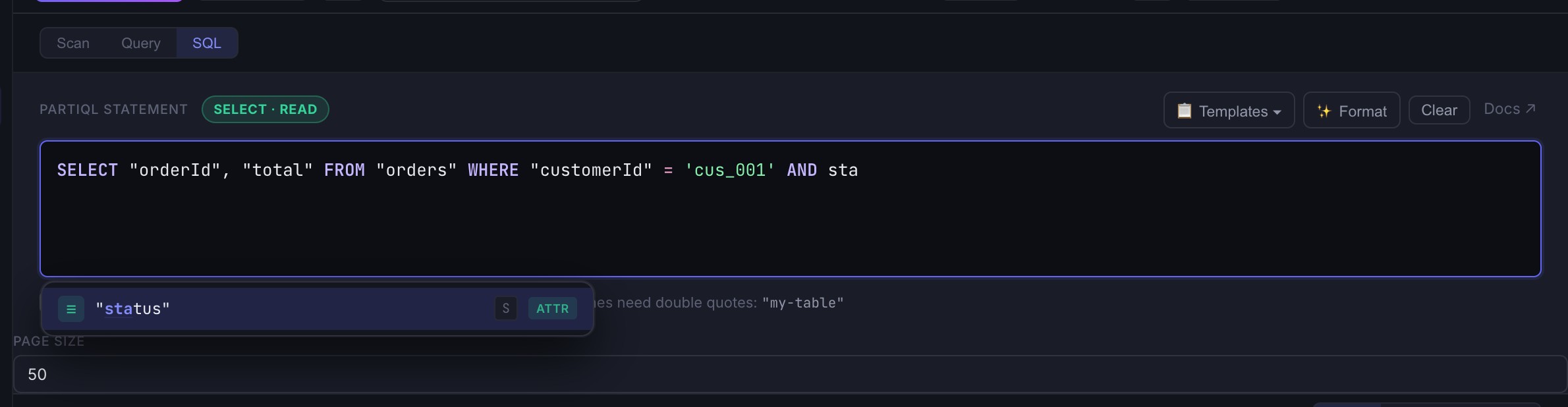
- Write PartiQL in an editor with syntax highlighting, autocomplete and templates built from your table schema.
- Edit a cell by double-clicking it, or open the full JSON editor. Insert, clone and bulk delete items.
- Restore a previous version of an item from the local history, with a field-by-field diff.
- See the read and write capacity DynamoDB reports for every operation, with a running total per table.
- Watch a table's DynamoDB Stream live: INSERT, MODIFY and REMOVE events as they happen.
- Export a table definition as CloudFormation, Terraform or Pulumi.
- Generate a data-access layer from a live table in TypeScript, Python, Java, C#, Go, Ruby or PHP.
- Import JSON, CSV and Excel files, and export results as JSON or CSV.
Why not just use the AWS Console?
- The console reloads on almost every action, which makes inspecting data slow.
- Editing an item means leaving the list, opening a form and saving it. There is no in-grid editing.
- The capacity each request consumed is not shown next to the result.
- It cannot connect to DynamoDB Local or LocalStack on your machine.
- Switching between accounts, roles and regions means signing in again or juggling browser sessions.
Connects to AWS and to local DynamoDB
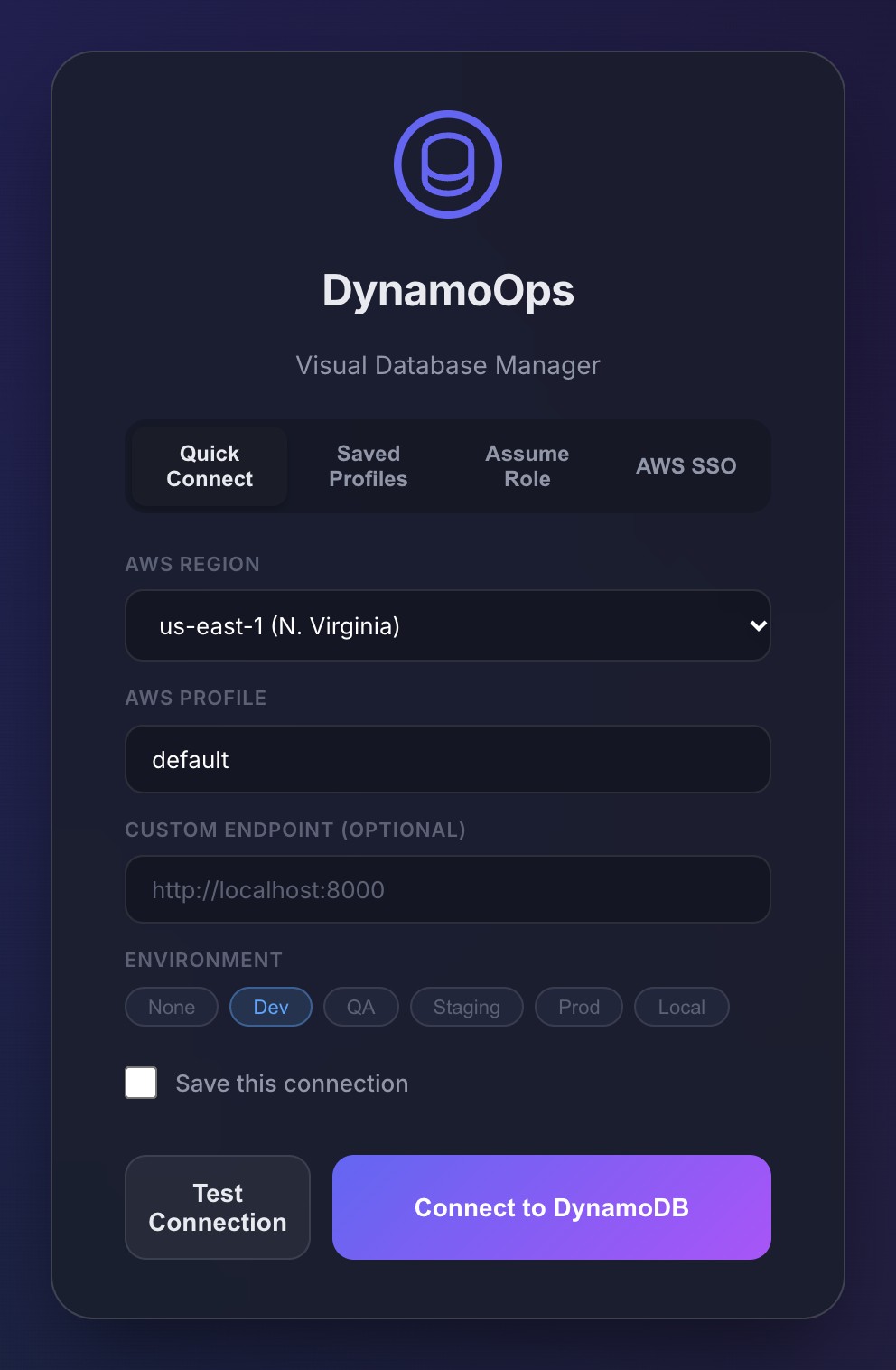
DynamoOps reads the profiles from your AWS CLI configuration, supports Assume Role for cross-account access and AWS SSO (IAM Identity Center) sign-in in the browser. For local development it accepts a custom endpoint, so the same app works with DynamoDB Local and LocalStack. Each connection can carry an environment tag such as dev, staging or prod, so you always know where you are.
Free, local and source-available
Every feature is free. There are no plans, no trial, no account and no license key. The app runs on your machine: credentials and table data never leave it, and there is no telemetry. The source code is public on GitHub under the MIT + Commons Clause license, and companies can use it internally.
Frequently asked questions
Is DynamoOps really free?
Yes. Every feature is included for everyone, with no plans, trials, account or license key. Installers for macOS and Windows are published on the GitHub releases page.
Does DynamoOps work on Mac and Windows?
Yes. There are builds for macOS on Apple Silicon and Intel, and an installer and a portable build for Windows 10 and 11. There is no Linux build yet, but you can run it from source.
Does this DynamoDB GUI work with DynamoDB Local and LocalStack?
Yes. Choose the custom endpoint connection and point it at your local endpoint, for example http://localhost:8000 for DynamoDB Local or http://localhost:4566 for LocalStack.
Are my AWS credentials sent anywhere?
No. DynamoOps talks to AWS directly from your machine using the AWS SDK. Credentials and table data are not sent to any DynamoOps server, and the app has no telemetry.
Try DynamoOps
Free, with every feature included and the source code on GitHub.
Download for macOS or Windows